Entra ID Temporary Access Pass
VO can let identities in an Entra identity store self-issue a Microsoft Entra Temporary Access Pass (TAP) from the Concierge, without needing to contact an administrator. This guide covers the Entra tenant setup, the Composer configuration, and what the identity sees.
For general identity store setup, see the Identity stores guide.
Pre-requisites
- An Entra ID tenant configured as an identity store in Composer, with a Graph client (Client ID and secret) already connected
- The Temporary Access Pass authentication method policy enabled in the Entra tenant, with the identity (directly or via group membership) included in its targets
- The identity store's app registration granted the Microsoft Graph application permissions below, with admin consent
| Permission | Purpose |
|---|---|
Policy.Read.AuthenticationMethod | Read the tenant's Temporary Access Pass policy to check eligibility |
UserAuthMethod-TAP.ReadWrite.All or UserAuthenticationMethod.ReadWrite.All | Issue a Temporary Access Pass for the identity |
UserAuthMethod-TAP.Read.All or UserAuthenticationMethod.Read.All | Check whether the identity already has an active, unused Temporary Access Pass |
User.Read.All | Resolve the identity (including whether it is a guest account) |
GroupMember.Read.All | Evaluate group-based policy targeting. User.Read.All alone cannot check group membership, so this is required whenever the policy includes or excludes groups. Directory.Read.All is a broader alternative that covers both rows. |
VO connects to Microsoft Graph using the identity store's app registration credentials directly (a client credentials flow), so these must be granted as application permissions, not delegated permissions.
Set up guide
-
In the Entra admin center, enable the Temporary Access Pass authentication method policy for the tenant, and include the identities (or groups) that should be able to self-issue a pass.
-
On the identity store's app registration, grant the application permissions listed above under API permissions, and grant admin consent.
-
In Composer, open the identity store's Edit page, go to the Features tab, and expand Temporary Access Pass issuance.
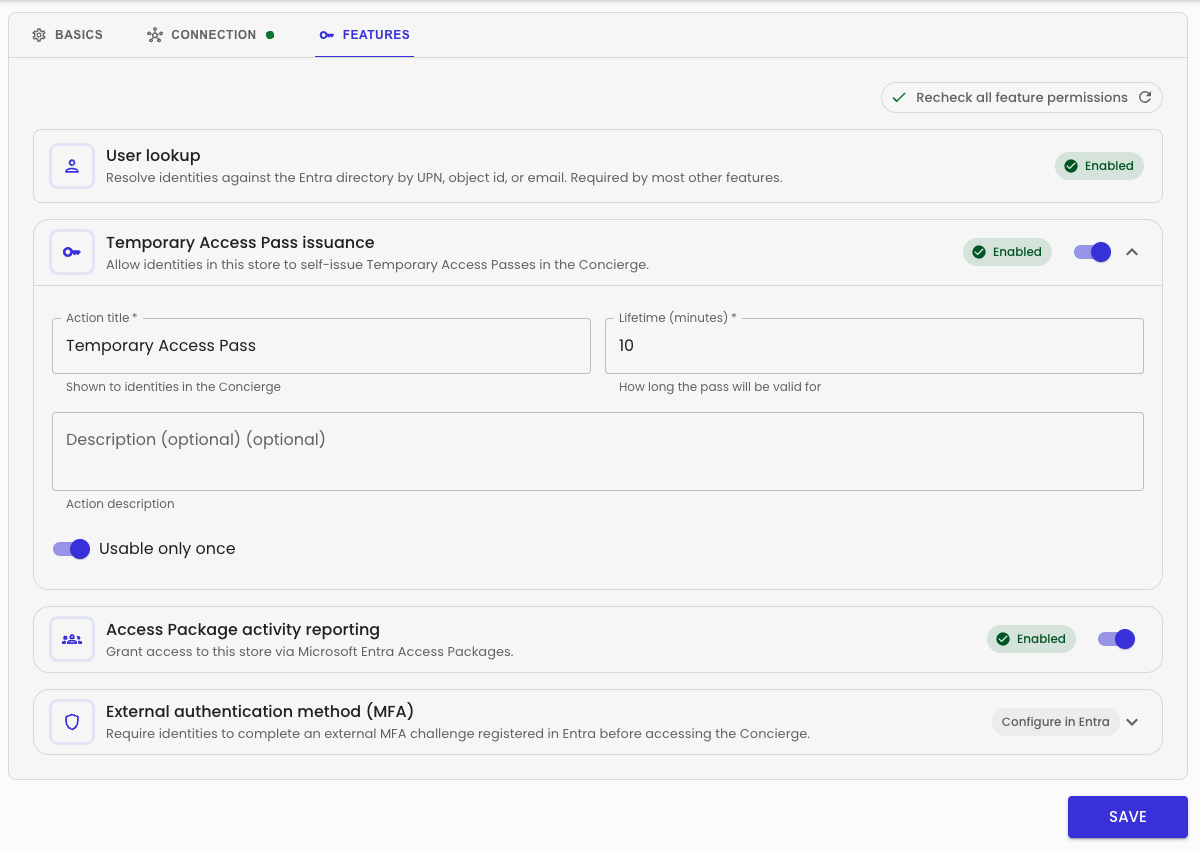
Turn on the feature, then configure:
- Action title — shown to identities in the Concierge (defaults to "Temporary Access Pass")
- Description (optional) — shown alongside the action title
- Lifetime (minutes) — how long an issued pass is valid for (defaults to 10, must be between 10 and 43200)
- Usable only once — whether the pass can only be used for a single sign-in (defaults to on)
Click Save.
-
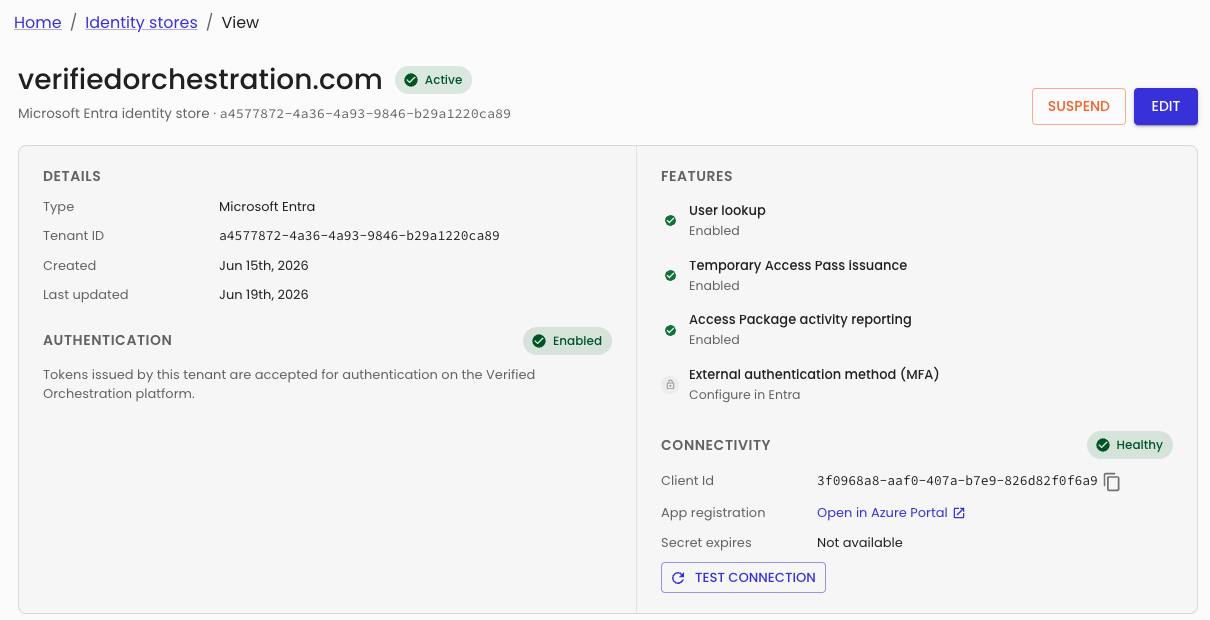
The identity store's View page reflects the feature's status alongside the other configurable Entra features.
What the identity sees in Concierge
Once enabled and eligible, the identity sees a Temporary Access Pass self-service action in the Concierge side rail, using the configured action title and description.

Selecting it immediately issues a pass and opens a dialog showing the code, a countdown to expiry, and (if the store is configured for one-time use) a warning that the pass can only be used once.
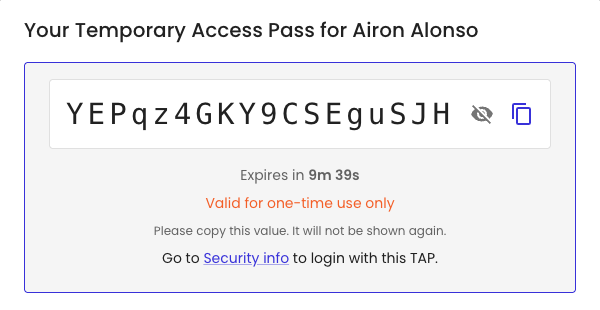
The code is shown once — the identity should copy it and use it to sign in via My Security info.
Troubleshooting
If the identity is not eligible, the self-service action is either hidden or shown disabled with a reason, depending on the cause.
Entra tenant configuration issues
| Reason | Cause | Administrator remedy |
|---|---|---|
| Policy disabled | The Temporary Access Pass authentication method policy is not enabled in the Entra tenant | Enable the policy in the Entra admin center |
| Policy not found | Microsoft Graph did not return a Temporary Access Pass policy for the tenant | Confirm the policy exists in the Entra tenant |
| User not included | The identity is not targeted by the policy's include list, either directly or via group membership | Add the identity or one of their groups to the policy's include targets |
| User excluded | The identity is targeted by the policy's exclude list, either directly or via group membership | Remove the identity or their group from the policy's exclude targets |
| Missing permissions | The identity store's app registration is missing one of the required Graph permissions | Grant the missing permission (see Pre-requisites) and grant admin consent |
Other unavailability reasons
These relate to the state of the identity or the Composer configuration, rather than the Entra tenant's policy setup.
| Reason | Cause | Remedy |
|---|---|---|
| Self-service disabled | Temporary Access Pass issuance is turned off for the identity store in Composer | Enable the feature on the identity store's Features tab |
| Service not configured | The identity store has no working Graph connection | Complete the Graph client setup on the identity store |
| User not found | The identity could not be resolved to an Entra ID user | Confirm the identity is correctly linked to an Entra ID account |
| Guest user not eligible | The Entra ID account is a guest user, not a member | Not resolvable — guest accounts cannot self-issue a Temporary Access Pass |
| Already has an active pass | The identity already holds an active, unused Temporary Access Pass | Wait for the existing pass to expire or be used |
[VERIFY] The exact wording shown to identities for each reason is generated server-side and may be refined over time — treat the reasons above as the current cause, not guaranteed literal copy.