Entra ID External Authentication Method
The VO OIDC Provider supports being configured as an External Authentication Method (EAM) for identity verification and MFA in Entra ID.
 Caution
Entra ID authentications flows on mobile devices that use Entra EAM with Verifiable Credentials (VC) are not supported.
VO is working with Microsoft to resolve this issue.
Pre-requisites
- An Entra ID workforce tenant
- The Entra tenant where EAM will be enabled must be configured as an identity store in the VO Composer
- Credential holders must be linked to the Entra ID account they are entitled to access
Credential holder identity lookup
When using EAM, the Entra ID user's identity must be resolved to a VO credential holder identity. The identity resolution happens by searching for the identity using the tid (Tenant ID) and oid (Object ID) taken from the id_token_hint passed by Entra ID during the authentication process. See how an Entra ID account maps to a link for more information.
Set up guide
The official documentation for setting up an EAM can be found here.
The general flow is:
- Create an App Registration in Entra ID.
- Register an OIDC client in the VO Composer.
- Register an external authentication method in Entra ID.
- Enable the authentication method.
1. Create an App Registration in Entra ID
In the Entra ID portal, create a new App Registration with the following settings:
- Supported account types should be 'Multiple Entra ID tenants'
- Set a Redirect URI, for a Web platform and set the Redirect URI to the VO OIDC Provider authorization endpoint (
{yourInstanceUrl}/oidc/auth) - From API permissions, grant delegated rights for Microsoft Graph
openidandprofilepermissions - Grant admin consent for the API permissions.
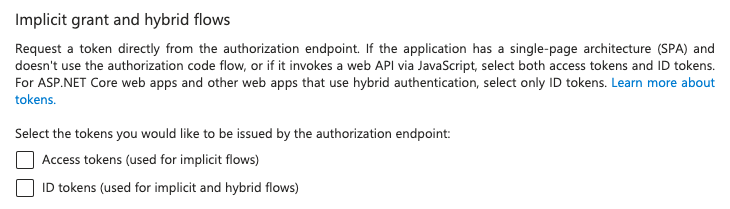
Confirm the following Authentication settings for Web and SPA implicit grant and hybrid flows are not checked.
- Access tokens (used for implicit flows)
- ID tokens (used for implicit and hybrid flows)
2. Register an OIDC Client in the VO Composer
As Entra ID's EAM uses OIDC to provide the multifactor authentication, a OIDC client registration on the VO platform must be registered and with the following details:
One of the following URIs must be used as the Redirect URI, but depending on the Azure instance you are using, the URI will be different. For most, the first URI will be the correct one to use.
- https://login.microsoftonline.com/common/federation/externalauthprovider (Azure)
- https://login.microsoftonline.us/common/federation/externalauthprovider (Azure US - Government)
- https://login.partner.microsoftonline.cn/common/federation/externalauthprovider (Azure - China)
VO recommendationFurther identity proofing requirements can be configured in the OIDC client configuration.
We recommend using a specific credential for MFA
3. Register an external authentication method in Entra ID
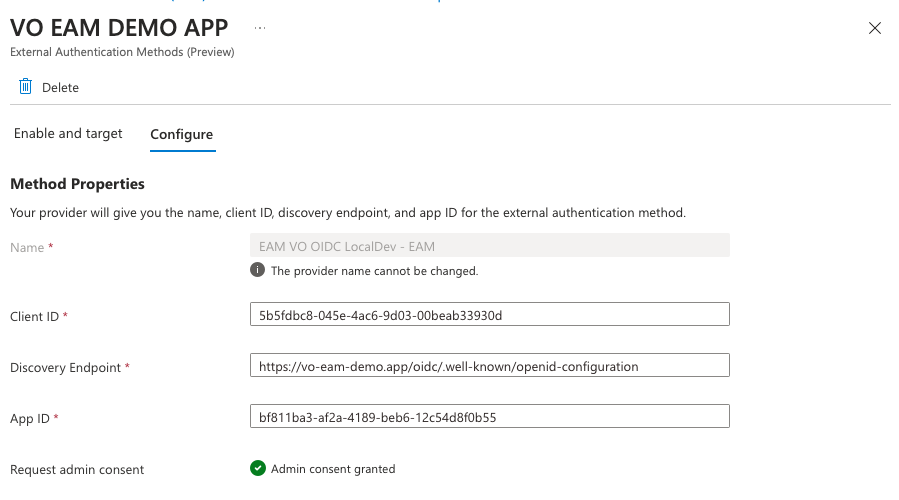
When setting up the authentication method, the following important details are required:
- Client ID: the Client ID of the OIDC Client registered in the VO Composer.
- Discovery Endpoint: the Discovery URL of the VO instance OIDC Provider, which is
{yourInstanceUrl}/oidc/.well-known/openid-configuration. - App ID: The 'Application (client) ID' of the App Registration in Entra ID.
If admin consent has been granted for Microsoft Graph openid and profile in the App Registration, the authentication method will work without requiring additional admin consent.
4. Enable the Authentication Method
Entra ID must still be configured to allow (or enforce) the use of a VO credential for MFA.
Where Entra Security Defaults are used, the authentication method must be enabled in one of two ways:
- A user can manage their authentication methods in their account Security Info page.
- An administrator can enable the authentication method for a user.
Where Entra is using Conditional Access, policy can be configured to enforce the use of the VO credential for MFA.
See https://learn.microsoft.com/en-us/entra/identity/authentication/how-to-authentication-external-method-manage#user-experience for more.
Troubleshooting
Error: 'AADSTS900491: Service principal your App ID not found'.
Admin consent for the application is required in the tenant that uses the EAM. If consent has not been granted for the openid and profile permissions, the user will receive this error during the MFA flow.
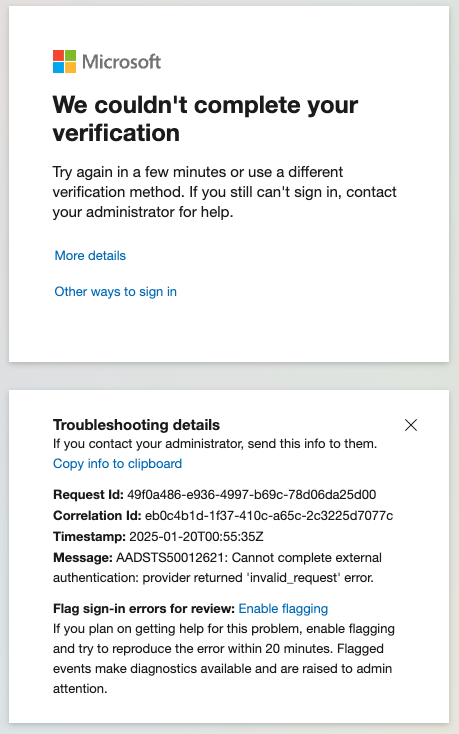
Error: 'Cannot complete external authentication: provider returned 'invalid_request' error.'
The Entra ID tenant is not correctly configured as an identity store in VO
Expand screenshot
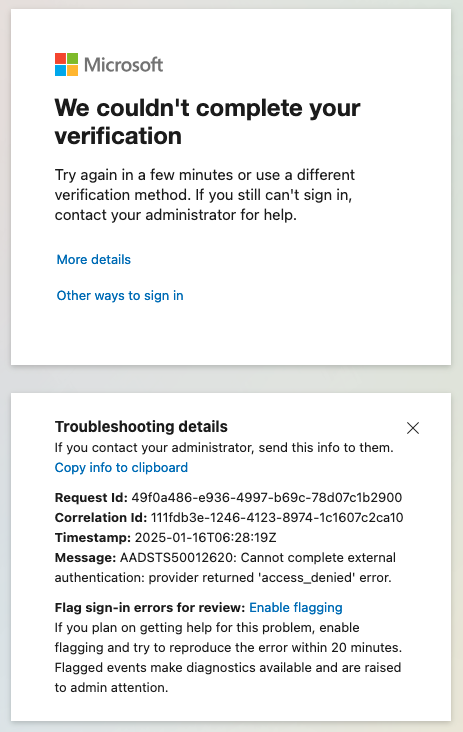
Error: 'Cannot complete external authentication: provider returned 'access_denied' error.'
The Entra ID user's identity cannot be resolved during an EAM MFA authentication flow. Ensure the Entra ID users object ID is correctly linked to the VO credential holder identity.
Expand screenshot